


Telecomando de Infravermelhos
O telecomando incluído, assim como a disposição dos botões e os respetivos nomes variam consoante o modelo/país/região.
Botões superiores do telecomando
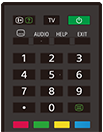
 (apresentação das informações/texto)
Apresenta informações.
TV
Permite mudar para um canal de televisão ou uma entrada e apresenta a Menu TV. Para obter mais informações, consulte a página Utilizar o Menu TV .
 (Desligar/ligar)
Permite ligar ou mudar para o modo de espera/modo de espera em rede.
 (definição de legendas)
Ativa ou desativa as legendas (se esta funcionalidade estiver disponível).
AUDIO
Seleciona o som de fontes multilingues ou bilingues para o programa que está a ser visualizado (consoante a fonte do programa).
HELP
Apresenta o menu de ajuda. A partir daqui, é possível aceder ao Guia de ajuda.
EXIT
Permite regressar ao ecrã anterior ou sair do menu. Se estiver disponível um serviço de aplicações interativas, carregue neste botão para sair do serviço.
Botões numéricos/・(ponto)
Utilize os botões 0-9 para selecionar canais digitais.
 (texto)
Apresenta informações de texto.
Botões de cores
Executam a função correspondente nesse momento.
Botões inferiores do telecomando
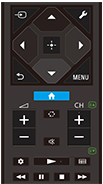
 (selecionar entrada)
Apresenta e seleciona a fonte de entrada, etc. Para obter mais informações, consulte a página Selecionar as entradas.
 (Definições rápidas)
Apresenta as Definições rápidas. Para obter mais informações, consulte a página Utilizar o Definições rápidas .
 (cima) /
 (baixo) /
 (esquerda) /
 (direita) /
 (introduzir) (seletor de navegação)
Navegação e seleção de menus no ecrã.
 (RETROCEDER)
Permite regressar ao ecrã anterior.
 (HOME)
Apresenta o Menu Home do televisor. Para obter mais informações, consulte a página Menu Home.
MENU
Apresenta um menu no televisor para utilizar funções dos botões que não estão disponíveis no telecomando no ecrã.
 +/- (volume)
Permite ajustar o volume.
 (alternar)
Alterna entre dois canais ou entradas. O televisor alterna entre o canal ou entrada atual e o último canal ou entrada selecionados.
 (silenciar)
Permite silenciar o som. Volte a carregar para repor o som.
Sugestão
- É possível ligar ou desligar o serviço de atalho para acessibilidade mantendo
(silenciar) premido durante 3 segundos.
CH +/- (canal)
No modo de televisor: Seleciona o canal.
No modo de texto: seleciona a página
 (seguinte) ou
 (anterior).
 (Painel de controlo)
Apresenta as Painel de controlo.
 (Reproduzir) /
 (recuar rápido) /
 (pausa) /
 (parar) /
 (avançar rápido)
Permite controlar os conteúdos multimédia no televisor e no dispositivo compatível com BRAVIA Sync ligado.
 (guia)
Apresenta o guia de programas digital do televisor ou da TV box de cabo. Para obter mais informações, consulte a página Utilizar o guia de programas.
Para fechar este ecrã e passar para o ecrã Definições, selecione o link seguinte.
 Passe para o ecrã Definições
Como silenciar o som do telecomando
-
Carregue no botão
(Definições rápidas) do telecomando e selecione o seguinte, por ordem, para desativar.[Definições] — [Sistema] — [Sons do sistema]
Acerca da substituição das pilhas do telecomando
- Abra a tampa do telecomando conforme apresentado abaixo.
- Remova a tampa do telecomando e substitua as pilhas por outras novas.
- Verifique se a orientação de cada pilha corresponde aos símbolos de positivo (+) e negativo (-) no compartimento de pilhas.
-
Tipo deslizamento

-