


Telecomandă cu infraroşii
Telecomanda inclusă, precum şi dispunerea butoanelor şi denumirile de butoane, variază în funcţie de modelul/ţara/regiunea dumneavoastră.
Butoane din partea superioară a telecomenzii
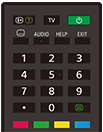
 (Afişare informaţii/text)
Afişaţi informaţii.
TV
Comutaţi la un canal TV sau o sursă de intrare şi afişaţi Meniu TV. Pentru detalii, consultaţi pagina Utilizarea Meniu TV .
 (Pornire)
Porneşte sau comută la modul de aşteptare/conectat la reţea.
 (Setare subtitrare)
Activaţi sau dezactivaţi subtitrările (atunci când această caracteristică este disponibilă).
AUDIO
Selectaţi sonorul cu sursă multilingvă sau sunetul dual pentru programul în curs de vizionare (în funcţie de sursa programului).
HELP
Afişaţi meniul de asistenţă. Ghid de asistenţă poate fi accesat de aici.
EXIT
Reveniţi la ecranul anterior sau părăsiţi meniul. Atunci când este disponibil un serviciu de tip aplicaţie interactivă, apăsaţi pentru a părăsi serviciul.
Buton numeric/・(Punct)
Utilizaţi butoanele 0-9 pentru a selecta canale digitale.
 (Text)
Afişaţi informaţii sub formă de text.
Butoane colorate
Executaţi funcţia corespunzătoare în momentul respectiv.
Butoane din partea inferioară a telecomenzii
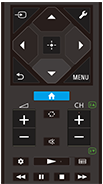
 (Selectare sursă de intrare)
Afişaţi şi selectaţi sursa de intrare etc. Pentru detalii, consultaţi pagina Selectarea surselor de intrare.
 (Setări rapide)
Afişaţi Setări rapide. Pentru detalii, consultaţi pagina Utilizarea Setări rapide .
 (Sus) /
 (Jos) /
 (Stânga) /
 (Dreapta) /
 (Introducere) (Navigare cu pad direcţional)
Navigarea prin şi selectarea elementelor din meniul de pe ecran.
 (ÎNAPOI)
Reveniţi la ecranul anterior.
 (ECRAN PRINCIPAL)
Afişaţi meniul principal al televizorului. Pentru detalii, consultaţi pagina Meniul principal.
MENU
Afişaţi un meniu pe ecranul televizorului pentru utilizarea funcţiilor butonului care nu se regăsesc pe telecomandă.
 +/- (Volum)
Reglaţi volumul.
 (Salt)
Faceţi salturi înainte şi înapoi între două canale sau surse de intrare. Televizorul alternează între canalul sau sursa de intrare actual(ă) şi ultimul canal sau ultima sursă de intrare selectat(ă).
 (Oprire sonor)
Dezactivaţi sunetul. Apăsaţi din nou pentru a restabili sunetul.
Sugestie
- Serviciul de accesibilitate poate fi pornit sau oprit apăsând şi menţinând apăsat butonul
(Oprire sonor) pentru 3 secunde.
CH +/- (Canal)
În modul TV: Selectaţi canalul.
În modul Text: Selectaţi pagina
 (Următoare) sau
 (Anterioară).
 (Tablou de bord)
Afişaţi Tablou de bord.
 (Redare) /
 (Derulare rapidă înapoi) /
 (Pauză) /
 (Stop) /
 (Derulare rapidă înainte)
Operaţi conţinutul media pe televizor şi dispozitivul compatibil BRAVIA Sync conectat.
 (Ghid)
Afişaţi ghidul de programe digitale ale televizorului sau receptorului de cablu/satelit. Pentru detalii, consultaţi pagina Utilizarea ghidului de programe.
Pentru a închide acest ecran și a trece direct la ecranul Setări, selectați linkul următor.
 Treceți direct la ecranul Setări
Dezactivarea sunetului de acţionare a telecomenzii
-
Apăsaţi butonul
(Setări rapide) de pe telecomandă şi selectaţi următoarele în ordine pentru a le dezactiva.[Setări] — [Sistem] — [Sunete de sistem]
Despre înlocuirea bateriei de la telecomandă
- Deschideţi capacul telecomenzii după cum este prezentat mai jos.
- Îndepărtaţi capacul telecomenzii şi înlocuiţi bateriile cu unele noi.
- Verificaţi dacă orientarea fiecărei baterii corespunde simbolurilor pozitiv (+) şi negativ (-) din compartimentul bateriei.
-
Tip culisant

-