


Infračervený diaľkový ovládač
Pribalený diaľkový ovládač či rozmiestnenie a názvy tlačidiel sa líšia v závislosti od modelu/krajiny/oblasti.
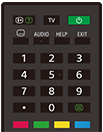
Horné tlačidlá diaľkového ovládača
 (Ukázať informácie/text)
Zobrazenie informácií.
TV
Prepínanie na TV kanál alebo vstup a zobrazenie Ponuka TV. Podrobnosti nájdete na strane Používanie Ponuka TV .
 (Napájanie)
Zapnutie alebo prepnutie do pohotovostného režimu/sieťového pohotovostného režimu.
 (Nastavenie titulkov)
Zapnutie alebo vypnutie titulkov (ak je táto funkcia dostupná).
AUDIO
Slúži na výber zvuku viacjazyčného zdroja alebo duálneho zvuku pre aktuálne sledovaný program (v závislosti od zdroja programu).
HELP
Zobrazenie ponuky Pomocník. Tu možno otvoriť aj Príručka.
EXIT
Vráťte sa na predošlú obrazovku alebo z ponuky odíďte. Ak je k dispozícii služba interaktívnej aplikácie, stlačením službu ukončíte.
Číselné tlačidlo/・(Bod)
Pomocou tlačidiel 0 až 9 si vyberte digitálne kanály.
 (Text)
Zobrazenie textových informácií.
Farebné tlačidlá
Slúžia na spustenie príslušnej funkcie.
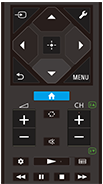
Spodné tlačidlá diaľkového ovládača
 (Výber vstupu)
Slúži na zobrazenie a výber vstupného zdroja atď. Podrobnosti nájdete na strane Výber vstupov.
 (Rýchle nastavenia)
Slúži na zobrazenie možnosti Rýchle nastavenia. Podrobnosti nájdete na strane Používanie Rýchle nastavenia .
 (Nahor) /
 (Nadol) /
 (Doľava) /
 (Doprava) /
 (Potvrdiť) (Navigačný volič)
Navigácia a výber možností na obrazovke.
 (SPÄŤ)
Návrat na predchádzajúcu obrazovku.
 (DOMOV)
Zobrazí sa domovská ponuka TV. Podrobnosti nájdete na strane Hlavná ponuka.
MENU
Zobrazte ponuku na televízore, aby ste mohli používať funkcie tlačidiel, ktoré nie sú na diaľkovom ovládači na obrazovke.
 +/- (Hlasitosť)
Nastavenie hlasitosti.
 (Preskočiť)
Možnosť preskakovania medzi dvomi kanálmi alebo vstupmi. TV prepína medzi aktuálnym kanálom alebo vstupom a naposledy zvoleným kanálom alebo vstupom.
 (Stlmiť)
Stlmenie hlasitosti. Opätovným stlačením zvuk obnovíte.
Rada
- Službu skratky dostupnosti môžete zapnúť a vypnúť stlačením a podržaním tlačidla
(Stlmiť) na 3 sekundy.
CH +/- (Kanál)
V režime TV: Výber kanálu.
V textovom režime: Vyberte stranu
 (Ďalšia) alebo
 (Predchádzajúca).
 (Hlavný panel)
Slúži na zobrazenie možnosti Hlavný panel.
 (Prehrať) /
 (Rýchlo pretočiť) /
 (Pozastaviť) /
 (Zastaviť) /
 (Rýchlo dopredu)
Ovládanie mediálneho obsahu na TV a pripojenom zariadení kompatibilnom s BRAVIA Sync.
 (Príručka)
Slúži na zobrazenie digitálneho programového sprievodcu televízora alebo Set-top boxu. Podrobnosti nájdete na strane Používanie programovej príručky.
Ak chcete zatvoriť túto obrazovku a prejsť na obrazovku Nastavenia, vyberte nasledujúci odkaz.
 Prechod na obrazovku Nastavenia
Ako stlmiť zvuk prevádzky diaľkového ovládača
-
Na diaľkovom ovládači stlačte tlačidlo
(Rýchle nastavenia) a vyberte nasledujúce možnosti, aby ste ich deaktivovali.[Nastavenia] — [Systém] — [Systémové zvuky]
O výmene batérie diaľkového ovládača
- Otvorte kryt diaľkového ovládača, ako je znázornené nižšie.
- Odoberte kryt diaľkového ovládača a vymeňte batérie.
- Uistite sa, že sa kladné a záporné póly batérií zhodujú s kladnými (+) a zápornými (-) značkami vnútri priestoru pre batérie.
-
Posuvný typ

-