


IR daljinski upravljalnik
Priloženi daljinski upravljalnik, razporeditev in imena gumbov se lahko razlikujejo, kar je odvisno od vašega modela/države/regije.
Zgornji gumbi na daljinskem upravljalniku
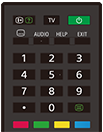
 (informacije/prikaz besedila)
Prikažite informacije.
TV
Preklopite na televizijski kanal ali vhod in prikažite Meni TV. Če želite izvedeti več, glejte stran Uporaba Meni TV .
 (Vklop/izklop)
Vklop ali preklop v stanje pripravljenosti/omrežno stanje pripravljenosti.
 (nastavitev podnapisov)
Vklopite oziroma izklopite podnapise (če je ta funkcija na voljo).
AUDIO
Izberite zvok večjezičnega vira ali dvojni zvok za program, ki ga trenutno gledate (odvisno od vira programa).
HELP
Prikažite meni Pomoč. Tukaj je na voljo Vodnik za pomoč.
EXIT
Vrnite se na prejšnji zaslon ali zapustite meni. Če je storitev interaktivne aplikacije na voljo, pritisnite, da zapustite storitev.
Številski gumb/・(pika)
Uporabite gumbe 0–9, da izberete digitalne kanale.
 (Text)
Prikažite informacije v obliki besedila.
Barvni gumbi
Zaženite funkcije, ki so dodeljene posameznim gumbom.
Spodnji gumbi na daljinskem upravljalniku
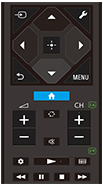
 (Izbira vhoda)
Prikažite in izberite vhodni vir ipd. Za podrobnosti glejte stran Izbiranje vhodov.
 (Hitre nastavitve)
Prikažite Hitre nastavitve. Če želite izvedeti več, glejte stran Uporaba Hitre nastavitve .
 (Gor) /
 (Dol) /
 (Levo) /
 (Desno) /
 (Vnos) (smerni gumbi za pomikanje)
Za pomikanje po zaslonskih menijih in izbiranje.
 (NAZAJ)
Vrnite se na prejšnji zaslon.
 (DOMOV)
Prikažite meni Domov televizorja. Če želite izvedeti več, glejte stran Meni Domov.
MENU
Prikaz menija na televizorju za uporabo funkcij gumbov, ki ne obstajajo na daljinskem upravljalniku, na zaslonu.
 +/- (glasnost)
Prilagajajte glasnost.
 (preskakovanje)
Pomikajte se nazaj in naprej med kanaloma ali vhodoma. Televizor preklopi med trenutnim kanalom ali vhodom in nazadnje izbranim kanalom oziroma vhodom.
 (utišanje)
Utišajte zvok. Pritisnite znova, da vklopite zvok.
Namig
- Storitev bližnjic za dostopnost je mogoče vključiti ali izključiti, tako da pritisnete in držite gumb
(Utišanje) za 3 sekunde.
CH +/- (kanal)
V načinu televizorja: Izberite kanal.
V načinu besedila: Izberite
 (naslednjo) ali
 (prejšnjo) stran.
 (Nadzorna plošča)
Prikažite Nadzorna plošča.
 (predvajanje) /
 (hitro pomikanje nazaj) /
 (premor) /
 (zaustavitev) /
 (hitro pomikanje naprej)
Upravljajte s predstavnostnimi vsebinami na televizorju in priključeni napravi, ki podpira funkcijo BRAVIA Sync.
 (Vodnik)
Prikažite vodnik po digitalnih programih televizorja ali kabelskega/satelitskega vmesnika. Če želite izvedeti več, glejte stran Uporaba vodnika po programih.
Če želite zapreti ta zaslon in skočiti na zaslon Nastavitve, izberite naslednjo povezavo.
 Skoči na zaslon Nastavitve
Izklop zvoka ukazov na daljinskem upravljalniku
-
Pritisnite gumb
(Hitre nastavitve) na daljinskem upravljalniku in izberite naslednje možnosti, če jih želite onemogočiti.[Nastavitve] — [Sistem] — [Zvoki sistema]
Menjava baterije daljinskega upravljalnika
- Odprite pokrovček na daljinskem upravljalniku, kot je prikazano spodaj.
- Snemite pokrovček na daljinskem upravljalniku in baterije zamenjajte z novimi.
- Preverite, ali se orientacija posamezne baterije ujema s simboloma za pozitivni (+) in negativni (-) pol v predalčku za baterije.
-
Drsni tip

-