


IC daljinski upravljač
Isporučeni daljinski upravljač, kao i raspored tastera i njihovi nazivi, se razlikuju u zavisnosti od vašeg modela/zemlje/regiona.
Gornji tasteri na daljinskom upravljaču
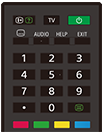
 (otkrivanje informacija/teksta)
Prikazivanje informacija.
TV
Prebacuje na TV kanal ili ulaz i prikazuje TV meni. Za pojedinosti pogledajte stranicu Upotreba TV meni .
 (Napajanje)
Uključuje ili prebacuje na režim pripravnosti/pripravnosti na mreži.
 (podešavanje titlova)
Uključivanje i isključivanje titlova (kada je ta funkcija dostupna).
AUDIO
Izaberite zvuk izvora na više jezika ili dualni zvuk za program koji se trenutno gleda (zavisi od izvora programa).
HELP
Prikazivanje menija Pomoć. Ovde možete da pristupite Vodič za pomoć.
EXIT
Povratak na prethodni ekran ili izlazak iz menija. Kada je dostupna usluga interaktivnih aplikacija, pritisnite da biste izašli iz te usluge.
Taster sa brojem/・(tačka)
Pomoću tastera sa ciframa 0–9 izaberite digitalne kanale.
 (tekst)
Prikazivanje informacije sa tekstom.
Tasteri u boji
Odgovarajuća funkcija se izvršava u datom trenutku.
Donji tasteri na daljinskom upravljaču
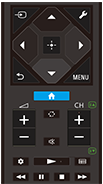
 (izbor ulaznog signala)
Prikazuje i bira izvor ulaznog signala itd. Za pojedinosti pogledajte stranicu Izbor ulaznih signala.
 (Brza podešavanja)
Prikazuje Brza podešavanja. Za pojedinosti pogledajte stranicu Upotreba Brza podešavanja .
 (gore) /
 (dole) /
 (levo) /
 (desno) /
 (unos) („D-Pad“ za navigaciju)
Kretanje i biranje opcija u menijima na ekranu.
 (NAZAD)
Povratak na prethodni ekran.
 (GLAVNI MENI)
Prikazuje Glavni meni TV-a. Za pojedinosti pogledajte stranicu Glavni meni.
MENU
Na ekranu prikazuje meni za upotrebu funkcija tastera koji se ne nalaze na daljinskom upravljaču.
 +/- (jačina zvuka)
Podešavanje jačine zvuka.
 (skok)
Kretanje unapred i unazad između dva kanala ili izvora. TV se prebacuje između trenutnog kanala ili izvora i prethodno izabranog kanala ili izvora.
 (gašenje zvuka)
Gašenje zvuka. Pritisnite ponovo da biste ponovo uključili zvuk.
Savet
- Usluga prečica za lakši pristup se može uključiti ili isključiti tako što pritisnete i zadržite
(gašenje zvuka) 3 sekunde.
CH +/- (kanal)
U režimu TV-a: Izbor kanala.
U tekstualnom režimu: Izbor
 (naredne) ili
 (prethodne) strane.
 (Kontrolna tabla)
Prikazuje Kontrolna tabla.
 (reprodukcija) /
 (brzo premotavanje unazad) /
 (pauza) /
 (zaustavljanje) /
 (brzo premotavanje unapred)
Rukovanje medijskim sadržajima na TV-u i priključenom uređaju koji je kompatibilan sa BRAVIA Sync.
 (vodič)
Prikazuje digitalni programski vodič TV-a ili kablovskog/satelitskog uređaja. Za pojedinosti pogledajte stranicu Upotreba programskog vodiča.
Da biste zatvorili ovaj ekran i prešli na ekran Podešavanja, izaberite sledeći link.
 Pređite na ekran Podešavanja
Kako isključiti zvuk rada daljinskog upravljača
-
Pritisnite taster
(Brza podešavanja) na daljinskom upravljaču, pa izaberite opcije po sledećem redosledu da biste ih onemogućili.[Podešavanja] — [Sistem] — [Sistemski zvuci]
O zameni baterije daljinskog upravljača
- Daljinski upravljač otvorite kao što je prikazano ispod.
- Uklonite poklopac daljinskog upravljača i zamenite baterije.
- Proverite da li smer svake baterije odgovara pozitivnom (+) i negativnom (-) simbolu u odeljku za baterije.
-
Tip sa klizajućim poklopcem

-