


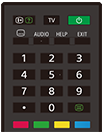
Infraröd fjärrkontroll
Den medföljande fjärrkontrollen, liksom ordningen på knapparna och knappnamnen varierar beroende på modell/land/region.
Övre knapparna på fjärrkontrollen
 (Info/Avslöja text)
Visa information.
TV
Växla till en TV-kanal eller ingång och visa TV-meny. Mer information finns på sidan Använda TV-meny .
 (Ström)
Slår på eller växlar till standby/nätverksläge.
 (Inställning för undertexter)
Slå på eller av undertexter (när funktionen är tillgänglig).
AUDIO
Välj ljud från en flerspråkig källa eller dubbelt ljud för det program som visas (beroende på programmets källa).
HELP
Visa Hjälp-menyn. Hjälpguide finns tillgänglig här.
EXIT
Återgå till den föregående skärmen eller avsluta menyn. Tryck för att avsluta tjänsten när en interaktiv programtjänst är tillgänglig.
Sifferknapp/・(Punkt)
Använd knapparna 0–9 för att välja digitala kanaler.
 (Text)
Visa textinformation.
Färgknappar
Utför motsvarande funktion vid den tiden.
Nedre knapparna på fjärrkontrollen
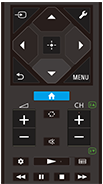
 (Ingångsval)
Visa och välj ingångskällan, m.m. Mer information finns på sidan Välja ingångar.
 (Snabbinställningar)
Visa Snabbinställningar. Mer information finns på sidan Använda Snabbinställningar .
 (Upp) /
 (Ner) /
 (Vänster) /
 (Höger) /
 (Bekräfta) (Navigation D-Pad)
Menynavigering och urval på skärmen.
 (TILLBAKA)
Återgå till den föregående skärmen.
 (START)
Visa TV:ns startmenyn. Mer information finns på sidan Startmenyn.
MENU
Visa en meny på TV:n för att använda knappfunktioner som inte finns på fjärrkontrollen.
 +/- (Volym)
Justera volymen.
 (Hoppa)
Hoppa fram och tillbaka mellan två kanaler eller ingångar. TV:n växlar mellan den aktuella kanalen eller ingången och den sista kanalen eller ingången som valdes.
 (Ljudlös)
Stäng av ljudet. Tryck igen för att återställa ljudet.
Tips
- Genvägarna för snabbåtkomst kan aktiveras eller inaktiveras genom att hålla in
(Ljudlös) i 3 sekunder.
CH +/- (Kanal)
I TV-läge: Välj kanalen.
I textläge: Välj sidan
 (Nästa) eller
 (Föregående).
 (Översikt)
Visa Översikt.
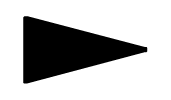 (Spela upp) /
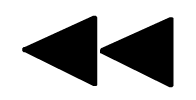 (Spola bakåt) /
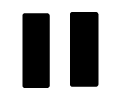 (Paus) /
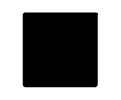 (Stopp) /
 (Spola framåt)
Använd mediainnehåll på TV:n och ansluten BRAVIA Sync-kompatibel enhet.
 (Guide)
Visa den digitala programguiden för TV:n eller TV-boxen. Mer information finns på sidan Använda programguiden.
För att stänga denna skärm och gå till Inställningar-skärmen, välj följande länk.
 Gå till Inställningar-skärmen
Så här stänger du av fjärrkontrollens driftljud
-
Tryck på
(Snabbinställningar)-knappen på fjärrkontrollen och välj följande i ordning för att inaktivera dem.[Inställningar] — [System] — [Systemljud]
Byta ut fjärrkontrollens batteri
- Öppna fjärrkontrollens batterilucka enligt instruktionerna nedan.
- Ta bort fjärrkontrollens lucka och byt ut batterierna.
- Kontrollera att batteriets positiva (+) och negativa (-) poler är rättvända enligt symbolerna i batterifacket.
-
Skjutbar typ

-