


IR Uzaktan Kumanda
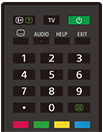
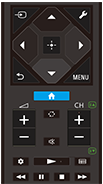
Ürünle birlikte gelen uzaktan kumanda, düğme düzeni ve düğme adları modelinize/ülkenize/bölgenize göre değişebilir.
Uzaktan kumanda üzerindeki üst düğmeler
 (Bilgi/Metin gösterimi)
Görüntü bilgileri.
TV
TV kanalı veya girişine geçiş yapın ve TV menüsü sayfasını görüntüleyin. Ayrıntılar için TV menüsü öğesini kullanma sayfasına bakın.
 (Güç)
(Güç)
Açılır veya bekleme/ağa bağlı bekleme moduna geçer.
null(Alt yazı ayarı)
Alt yazıları açın veya kapatın (özellik kullanılabilirse).
AUDIO
Görüntülenmekte olan programa yönelik çok dilli kaynak sesini veya çift sesi seçin (program kaynağına göre değişir).
HELP
Yardım menüsünü görüntüleyin. Yardım Kılavuzu’ye buradan erişilebilir.
EXIT
Önceki ekrana dönün veya menüden çıkın. Bir Etkileşimli Uygulama hizmeti kullanılabilir olduğunda hizmetten çıkmak için düğmeye basın.
Rakam Düğmesi/・(Nokta)
Dijital kanalları seçmek için 0-9 düğmelerini kullanın.
 (Metin)
Metin bilgilerini görüntüleyin.
Renk düğmeleri
O anda karşılık gelen işlevi çalıştırın.
Uzaktan kumanda üzerindeki alt düğmeler
 (Giriş seçimi)
Giriş kaynağı gibi öğeleri görüntüleyin ve seçin. Ayrıntılı bilgi için Girişleri seçme sayfasına bakın.
 (Hızlı Ayarlar)
Hızlı Ayarlar öğesini görüntüleyin. Ayrıntılar için Hızlı Ayarlar öğesini kullanma sayfasına bakın.
 (Yukarı) /
 (Aşağı) /
 (Sol) /
 (Sağ) /
 (Giriş) (Gezinme D-Pad)
Ekrandaki menüde gezinme ve seçme.
 (GERİ)
Önceki ekrana geri dönün.
 (ANA MENÜ)
TV Home Menu sayfasını görüntüleyin. Ayrıntılar için Home menüsü sayfasına bakın.
MENU
Uzaktan kumandada olmayan düğme işlevlerini kullanmanız için TV'de bir menü görüntüler.
 +/- (Ses)
Sesi ayarlayın.
 (Atla)
İki kanal veya giriş arasında geçişler yapın. TV mevcut kanal veya giriş ve seçilen son kanal veya giriş arasında geçiş yapar.
 (Sessiz)
Sesi kapatın. Sesi eski haline getirmek için tekrar basın.
İpucu
-
(Sessiz) tuşunu 3 saniye boyunca basılı tutarak erişilebilirlik kısayol hizmetini açıp kapatabilirsiniz.
CH +/- (Kanal)
TV modunda: Kanal seçin.
Metin modunda:
 (Sonraki) veya
 (Önceki) sayfasını seçin.
 (Kontrol paneli)
Kontrol paneli öğesini görüntüleyin.
 (Oynat) /
 (İleri Al) /
 (Duraklat) /
 (Durdur) /
 (İleri Al)
Medya içeriklerini TV'de ve bağlı olan BRAVIA Sync uyumlu cihazda çalıştırın.
 (Kılavuz)
TV veya TV kutusunun dijital program kılavuzunu görüntüleyin. Ayrıntılar için Program rehberini kullanma sayfasına bakın.
Bu ekranı kapatıp Ayarlar ekranına geçmek için aşağıdaki bağlantıyı seçin.
 Ayarlar ekranına geçin
Uzaktan kumanda işlemi sesini kapatmak için
-
Uzaktan kumandadaki
(Hızlı Ayarlar) düğmesine basın ve devre dışı bırakmak için sırayla aşağıdakileri seçin.[Ayarlar] — [Sistem] — [Sistem sesleri]
Uzaktan kumanda pilini değiştirme hakkında
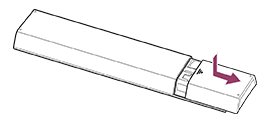
- Aşağıda gösterildiği şekilde uzaktan kumanda kapağını açın.
- Uzaktan kumanda kapağını çıkarın ve pilleri yenileriyle değiştirin.
- Her bir pilin yönünün pil bölmesindeki pozitif (+) ve negatif (-) sembollerle eşleştiğini kontrol edin.
-
Kayan tür
-