


Інфрачервоний пульт дистанційного керування
Пульт дистанційного керування, що входить до комплекту постачання, а також компонування та назви кнопок на ньому залежать від моделі, країни чи регіону.
Верхні кнопки на пульті дистанційного керування
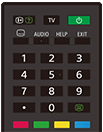
 (відображення інформації/тексту)
Відображення інформації.
TV
Перемикає на телевізійний канал або джерело вхідного сигналу та відображає меню ТВ. Докладнішу інформацію див. на сторінці Використання меню ТВ .
 (Живлення)
Увімкнення або перемикання на режим очікування чи мережевий режим очікування.
 (налаштування субтитрів)
Вмикає чи вимикає субтитри (коли ця функція доступна).
AUDIO
Виберіть джерело доступного звуку на кількох мовах або звук на двох мовах для програми, що переглядається в поточний момент (залежно від джерела програми).
HELP
Відображення меню довідки. Ця кнопка надає доступ до Довідка.
EXIT
Повернення на попередній екран або ж вихід з меню. Якщо доступна служба інтерактивної програми, натисніть для виходу з цієї служби.
Кнопка з цифрою/・(точка)
Використовується разом з кнопками з цифрами (0–9) для вибору цифрових каналів.
 (текст)
Відображення текстової інформації.
Кольорові кнопки
Запускають відповідні функції при натисненні.
Нижні кнопки на пульті дистанційного керування
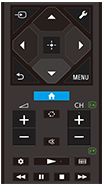
 (Вибір вхідного пристрою)
Відображення та вибір джерела вхідного сигналу тощо. Докладніше див. на сторінці Вибір входів.
 (Швидкі настройки)
Відображення Швидкі настройки. Докладнішу інформацію див. на сторінці Використання Швидкі настройки .
 (Вгору) /
 (Вниз) /
 (Вліво) /
 (Вправо) /
 (Введення) (перемикач напрямку додатків)
Здійснює навігацію в екранному меню та вибір пунктів.
 (НАЗАД)
Повернення на попередній екран.
 (ГОЛОВНЕ МЕНЮ)
Відображає головне меню телевізора. Докладнішу інформацію див. на сторінці Головне меню.
MENU
Відображення на телевізорі меню для використання функцій кнопок, відсутніх на пульті дистанційного керування на екрані.
 +/- (гучність)
Регулювання гучності.
 (перескочити)
Перехід між двома каналами або джерелами вхідного сигналу. Телевізор перемикатиметься між поточним каналом або джерелом вхідного сигналу та останнім вибраним каналом або джерелом вхідного сигналу.
 (заглушити)
Вимкнення звуку. Для відтворення звуку натисніть ще раз.
Підказка
- Швидкий доступ до спеціальних можливостей умикається або вимикається тривалим натисканням кнопки
(заглушити) упродовж 3 секунд.
CH +/- (канал)
У режимі телевізора: вибір каналу.
У текстовому режимі: вибір
 (наступної) або
 (попередньої) сторінки.
 (Інформаційна панель)
Відображення Інформаційна панель.
 (Відтворення) /
 (Перемотування назад) /
 (Пауза) /
 (Зупинення) /
 (Перемотування вперед)
Відтворення мультимедійного вмісту на телевізорі та підключеному пристрої, сумісному з BRAVIA Sync.
 (Програма передач)
Відображення цифрової програми передач телевізора чи ТВ-тюнера. Докладнішу інформацію див. на сторінці Використання програми передач.
Щоб закрити цей екран і перейти на екран Налаштування, натисніть наступне посилання.
 Перейти на екран Налаштування
Вимкнення звукових відгуків на команди пульта дистанційного керування
-
Натисніть кнопку
(Швидкі настройки) на пульті дистанційного керування та виберіть наведені нижче елементи в указаному порядку, щоб вимкнути їх.[Налаштування] — [Система] — [Системні звуки]
Заміна батарейок у пульті дистанційного керування
- Зніміть кришку з пульта дистанційного керування, як показано нижче.
- Зніміть кришку пульта дистанційного керування та встановіть нові батарейки.
- Переконайтеся, що позначки (+) і (-) у батарейному відсіку та на кожній батарейці збігаються.
-
Висувна кришка

-