


Voice Remote Control
The supplied Voice Remote Control, button layout, button names and available features vary depending on your model/country/region.
Upper buttons on the Voice Remote Control
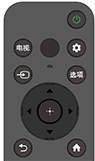
 (Power)
Turns on or switches to standby/networked standby mode.
电视
Switch to a TV channel or input and display the TV menu. For details, refer to Using the TV menu page.
 (MIC)
(MIC)
Speak into here to use the microphone in the Voice Remote Control. There is an LED above the microphone.
 (Quick Settings)
Display Quick Settings. For details, refer to Using the Quick Settings page.
Hint
- You can use the convenient [Find remote] feature to find the Voice Remote Control by pressing the Power button on the TV. For details, refer to Finding the Voice Remote Control (only models supplied with a buzzer built-in Voice Remote Control) .
 (Input select)
Display and select the input source, etc. For details, refer to the Selecting inputs page.
选项
Access functions from the onscreen menu.
 (Up) /
 (Down) /
 (Left) /
 (Right) /
 (Enter) (Navigation D-Pad)
On screen menu navigation and selection.
 (BACK)
Return to the previous screen.
 (HOME)
Display the TV Home Menu. For details, refer to the Home menu page.
Lower buttons on the Voice Remote Control

 +/- (Volume)
Adjust the volume.
 (Microphone)
Use voice search. (e.g. Search various content by voice.)
The microphone is at the top of the Voice Remote Control.
For details, refer to the Using the Voice Remote Control microphone page.
 (Application's menu)
Display the menu depending on the application.
 (Mute)
Mute the sound. Press again to restore the sound.
Hint
- The accessibility shortcut service can be turned on or off by pressing and holding
(Mute) for 3 seconds.
To close this screen and jump to the Settings screen, select the following link.
 Jump to the Settings screen
How to mute the Voice Remote Control operation sound
-
Press the
(Quick Settings) button on the Voice Remote Control, and select the following in order to disable them.[Settings] — [System] — [System sounds]
How to disable the Voice Remote Control backlight (only Voice Remote Control that feature backlight)
You can turn off the Voice Remote Control backlight.
-
Press and hold the
(Volume) - button and then
(HOME) button on the Voice Remote Control for 2 seconds.Release when the MIC LED on the Voice Remote Control lights up twice.
To enable the Voice Remote Control backlight again, perform the procedure above.
About replacing the Voice Remote Control battery
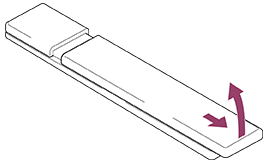
- Open the Voice Remote Control cover as shown below.
- Remove the Voice Remote Control cover and replace the batteries with new ones.
- Check that the orientation of each battery matches the positive (+) and negative (-) symbols in the battery compartment.
-
Sliding type
-