Connecting terminal
To close this screen and jump to the Settings screen, select the following link.
 Jump to the Settings screen
The availability of terminals and types or shapes of connectors may vary depending on your TV.
For the label and location of the terminals, refer to the Setup Guide (printed manual).
The Setup Guide can also be downloaded from the Support Site.
| Terminal label | Description |
|---|---|
|
|
USB Connects to Digital still camera/Camcorder/USB storage media. Note
|
|
|
Connects to the headphone jack to listen to sound from the TV. Note
To output sound from the TV speakers and the
Note
|
|
|
內建麥克風開關 Turns on/off the built-in MIC on the TV. (only TVs with a built-in MIC) The availability of the terminal label may vary depending on your TV. |
|
|
HDMI 輸入 Connects to the HDMI device. The HDMI interface can transfer the digital video and audio on a single cable. To enjoy high quality 4K contents, connect a Premium High Speed HDMI™ Cable(s) and follow the instructions displayed on the screen to set the [HDMI signal format] of the HDMI IN port. (HDCP 2.3-compatible) |
|
|
HDMI 輸入 (4K 120 Hz) If you use an HDMI device that supports video output in 4K 100/120 Hz, connect the Ultra High Speed HDMI™ Cable, and follow the instructions displayed on the screen to set the [HDMI signal format] of the HDMI IN port. (HDCP 2.3-compatible) Note
|
|
|
HDMI 輸入 (eARC/ARC) To connect an audio system that supports eARC (Enhanced Audio Return Channel) or ARC (Audio Return Channel), connect to the HDMI port labelled “eARC/ARC” on the TV. It is a feature that sends audio to an audio system that supports eARC/ARC through an HDMI cable. If the audio system does not support eARC/ARC, you need to connect with 光纖數位聲音輸出. HintThere may be three tactile dots, next to the HDMI input terminal depending on your model. Use them as a guide during installation. |
|
|
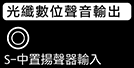
光纖數位聲音輸出 Connects to an audio system with optical audio input. Note
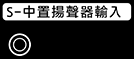
S-中置揚聲器輸入 Connects the TV and an audio device with an S-CENTER OUT output/jack using a Centre speaker mode cable. Before connecting, make sure you unplug the AC power cord (mains lead) of the TV and audio device to be connected. NoteIf you do not use the 中置揚聲器輸入 terminal or the S-中置揚聲器輸入 input, you will need to perform the following steps to prevent noise from the speakers.
HintThere may be two tactile dots, next to the S-中置揚聲器輸入 terminal depending on your model. Use them as a guide during installation. |
|
|
LAN Connect to a Router. |
|
|
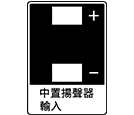
中置揚聲器輸入 To use your TV speakers as the centre speaker, connect the output of your AV receiver to the 中置揚聲器輸入 on your TV. Note
|