


Advanced auto volume
To close this screen and jump to the Settings screen, select the following link.
 Jump to the Settings screen
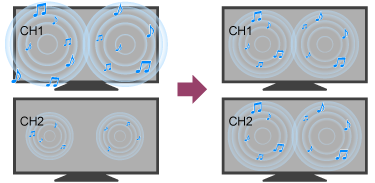
If [Speakers] is set to [TV speakers], the volume can be automatically adjusted to a certain level according to changes in the volume level of broadcasts and input signals.
Reducing the volume difference that occurs when switching channels or inputs allows you to watch at a constant volume level. To enable this feature, press the
 (Quick Settings) button on the remote control, then select the following settings.
[Settings] — [Display & Sound] — [Picture & Sound] — [Sound (***)] — [Advanced auto volume]
Note
- The effect varies depending on your model/country/region, settings, broadcast, and input signal.