


Using the built-in MIC on the TV (only TVs with a built-in MIC)
The built-in MIC on the TV may not be available depending on your region/country/language.
For details about languages that support the built-in MIC on the TV feature, refer to the following Sony support website.
https://www.sony.net/tv-hf/aep/

https://www.sony.net/tv-hf/aep/
Hint
- The URL is subject to change without notice.
To close this screen and jump to the Settings screen, select the following link.
 Jump to the Settings screen
Do more on your TV using only your voice. Just start with “Hey Google” to:
- Control your TV and smart home devices
- Enjoy music and entertainment
- Get answers
- Plan your day and manage tasks

Face the TV and say, “Hey Google” to get started.
When the voice function LED lights up or blinks in white, start speaking.
The location of the LED varies by model.
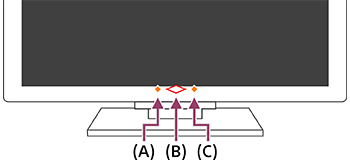

(A) Built-in MIC switch LED (On the centre left at the bottom of the TV. Only TVs with a built-in MIC.*)
(B) Operational response LED (In the centre at the bottom of the TV.)
(C) Voice function LED (On the centre right at the bottom of the TV. Only TVs with a built-in MIC.*)
* The built-in MIC on the TV may not be available depending on your region/model/language.
To use the built-in MIC, enable the following setting.
-
Turn on the built-in MIC switch on the TV.
The built-in MIC switch is located at the bottom centre of the TV. Refer to the Setup Guide.
There may be a tactile dot next to the built-in MIC switch depending on your model. To turn on the built-in MIC, slide the switch towards the tactile dot. - Pair the TV with the Voice Remote Control. For details, refer to
Remotes and accessories
page.
Press the Voice assistant/MIC button on the Voice Remote Control to complete the setup, depending on your model/country/region. (Only models with the built-in MIC switch)
Alternatively, press the
 (Quick Settings) button on the remote control, then select [Settings] — [Privacy] — [Voice assistant] — enable [Voice control] and [Hands-free mic].
Note
- Power consumption will increase when the built-in MIC is enabled as it is always listening.
-
The voice recognition performance of the built-in MIC may also degrade in the following cases.
- When eARC features are enabled
- When a sound bar is connected
- When [Digital audio out] is set to [Prioritise pass through]
Hint
- When the built-in MIC switch on the TV is enabled, the Operational response LED lights up in amber even when the TV is turned off (you can also set it so it does not light up).
-
The TV's built-in MIC may pick up sound from the surroundings and respond unintentionally. You can use [Built-in MIC sensitivity] to change the mic sensitivity.
Press the
(Quick Settings) button on the remote control, and select the following in order.[Settings] — [System] — [Built-in MIC sensitivity]