Parts and Controls of the Remote Commander
<TV tuner board installed models>
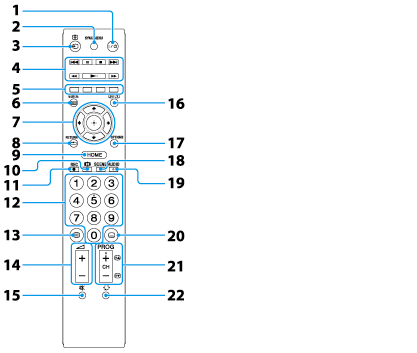
Describes the features of the remote commander, such as buttons.
-
 Power button
Press to turn on the TV.
-
SYNC MENU button
Press to display the “BRAVIA” Sync Menu and then select connected HDMI equipment from HDMI Device Selection.
Note
-
 /
/  Input select/Text hold button
In TV mode: Press to display a list of inputs.
In Text mode: Press to hold the current page.
-
Operating buttons A
-
Color buttons
When the color buttons are available, an operation guide appears on the screen.
-
GUIDE button
Press to display the digital program guide.
-
Operating buttons B
Press

/

/

/

to move the on-screen cursor. Press

to select/confirm a highlighted item.
-
RETURN button
Press to return to the previous screen or exit from the menu.
-
HOME button
Press to display the menu screen.
-
 Screen format button
Press to change the screen format.
-
REC button
Press to record the TV program to the external hard disk drive (not supplied) while watching TV.
-
0-9 buttons
Press 0-9 to select a channel.
-
 Text button
Press to display text information.
-
 Volume +/– buttons
Press to adjust the volume.
-
 Muting button
Press to turn off the sound. Press again to restore the sound.
-
 /
/  Info/Text reveal button
Each time you press the button, the display changes as follows:
In TV mode: Details of the current program

Details of the next program.
In Text mode: Reveals hidden information (e.g. answers to a quiz).
-
OPTIONS button
Press to display a list of convenient functions and menu shortcuts. The menu items vary based on the current input and/or content.
-
SCENE button
Press to display the Scene Select menu. Select the desired scene option for optimum sound and picture quality.
-
AUDIO button
Press to change the dual sound mode.
For TV mode, press to change the language for the program currently being viewed.
-
 Subtitle setting button
Press to turn subtitles on or off (when the feature is available).
-
CH/Program button
In TV mode: Press to select the next (+) or previous (–) channel.
In Text mode: Press to select the next (

) or previous (

) page.
-
 Jump button
Press to jump back and forth between two channels or inputs. The TV alternates between the current channel or input and the last channel or input that was selected.

 /
/  Prev / Next buttons
 Stop button
 Pause button
 Play button
 /
/  buttons