To transfer a playlist to your “WALKMAN,” you have to create playlists in My Library and playlists on Music Unlimited in advance.
For details on how to create My Library, visit http://music.SonyEntertainmentNetwork.com/.
You can create playlists using “Music Sync™” (a Windows application), which allows you to add music to My Library and upload playlists that you have created using other music management software.
Click [My Library] tab.
The My Library window appears.
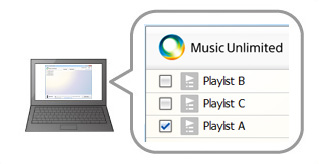
Click a check box to add a check mark to the desired playlist.
Check marks appear on playlists that have already been transferred.
When you add/remove check marks to/from playlists, the status of the size calculation bar changes according to the size of the data that will be transferred.
Click [Start Sync].
Transferring songs to your "WALKMAN" starts.
 Hints
Hints
For details on the My Library window, see “My Library window.”
If the channel content has been updated on Music Unlimited, Music Unlimited Transfer caches the updated content automatically.
If you format your “WALKMAN,” music data transferred by Music Unlimited Transfer will be deleted from your “WALKMAN.” To re-synchronize playlists to your “WALKMAN,” see “Re-synchronizing channels or playlists after you format your “WALKMAN.”
 Notes
Notes
Make sure not to disconnect your “WALKMAN” from your computer during synchronization.
The size calculation bar shows an approximate calculation of data sizes, therefore, the size shown may be different from the actual sizes.