


开启/关闭Bluetooth功能
要将Bluetooth音频设备连接到Walkman,需要先开启Bluetooth功能。
视设备而定,建立连接的步骤可能会有所不同。请参阅Bluetooth音频设备的使用说明书。
- 向下轻扫状态栏,然后点按
 -
-  [蓝牙]或
[蓝牙]或 [蓝牙已关闭]。
 - 点按以切换[打开]/[关闭]。
提示
- 为降低电池电量消耗,不使用Bluetooth功能时请将其关闭。
注意
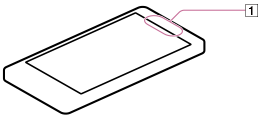
- Bluetooth通信天线(
 )内置在Walkman中。如果在使用Bluetooth通信时用手或其他物体挡住天线(),通信质量可能会受到影响。