
You can erase all files in the selected folder.
Note
- Once a file has been erased, you cannot retrieve it.
- You cannot erase a protected file. To erase the file, release the protection first, and then erase the file.
- In the stop mode, press MENU to enter the menu mode.
- Press
 or
or  to select “ERASE ALL,” and then press
  PLAY/ENTER.
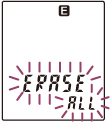
- Press PLAY/ENTER.
“ACCESS” appears in the display window and all files in the selected folder will be erased.
- Press
 (stop) to exit the menu mode.
Hint
- To cancel erasing, press (stop) in step 2.