
IC RecorderICD-PX333/PX333F
Erasing a file
You can select a file and erase it.
Note
- Once a file has been erased, you cannot retrieve it.
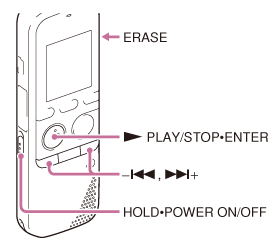
- Slide the HOLD・POWER ON/OFF switch in the direction of “POWER ON/OFF” to turn on the IC recorder, or towards the center to release the IC recorder from the HOLD status.
The stop mode window appears.
- In the stop or playback mode, select the file you want to erase.
- Press ERASE.
“Erase?” appears and the specified file is played back for confirmation.
- Press –
 or
or  + to select “YES.”
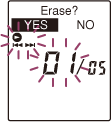
- Press
 PLAY/STOP・ENTER.
The “Erasing...” animation appears in the display window and the selected file will be erased.
When a file is erased, the remaining files will advance so that there will be no space between files.
Note
- You cannot erase a protected file. To erase the file, release the protection first, and then erase the file.
Hint
- To cancel erasing, select “NO” in step 4, and then press PLAY/STOP・ENTER.
- To erase a part of a file, divide the file into two files first, and then proceed with steps 3 through 5.
 Go to Page Top