
IC RecorderICD-PX333/PX333F
Recording from external equipment
You can make MP3 files without using the computer by recording sound from other equipment connected to the IC recorder.
Hint
- When you select “Audio IN” in the “Scene Select” menu, the settings suitable for recording from other equipment are already selected.
- Before you start recording, we recommend you make a trial recording first, or monitor the recording.
- If the input level is not strong enough, connect the headphone jack (minijack, stereo) of other equipment to the
 jack of the IC recorder and adjust the volume level on the piece of equipment connected to the IC recorder while checking the recording level guide.
- Connect a piece of external equipment (
 ) to the jack of the IC recorder when the IC recorder is in the stop mode.
Connect the audio output connector (stereo mini-plug) of other equipment to the
jack of the IC recorder using an audio connecting cable (not supplied).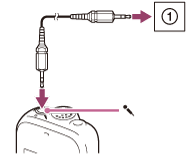
“Select Input” appears in the display window.
If “Select Input” is not displayed, set it in the menu.
- Press –
 or
or  + to select “Audio IN,” and then press
  PLAY/STOP・ENTER.
 - Press
 (stop) to exit the menu mode.
 - Press
 REC/PAUSE to start recording.
The built-in microphones are automatically cut off and the sound from the connected piece of equipment is recorded.
REC/PAUSE to start recording.
The built-in microphones are automatically cut off and the sound from the connected piece of equipment is recorded. - Start playback on the piece of equipment connected to the IC recorder.
Note
- When audio output of an external device connected to the IC recorder is monaural and the recording mode is set to “192kbps(MONO)” (SHQ) or “128kbps(MONO)” (HQ), sounds are recorded only in one channel. In this case, set the recording mode to “48kbps(MONO)” (SP) or “8kbps(MONO)” (LP) in the menu.
Hint
- To stop recording, press (stop).
 Go to Page Top