


Charging the battery with a computer
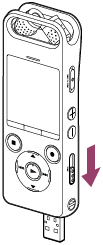
- Slide the USB slide lever in the direction of the arrow.
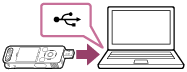
- Insert the USB connector into the USB port of a running computer. (*1)
While the battery is charging, the “Connecting” animation and the battery indicator animation (
 ) appear on the display window.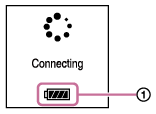
When the battery is fully charged, the battery indicator will indicate
 (
( ).
).If you charge the battery of your IC recorder for the first time or you have not use the IC recorder for a long time, charge the battery until the
indicator appears on the display window. It takes about 3 hours (*2) to fully charge an exhausted battery.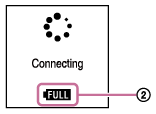
*1 If you cannot connect your IC recorder directly to the USB port on the computer, use the supplied USB connection support cable.
*2 This value is estimated, provided that the exhausted battery is fully charged at room temperature. It varies depending on the remaining power and the condition of the battery.
Note
- If your IC recorder is connected to a computer which is not running or in a power saving mode (standby or sleep), the battery will not charge.
