
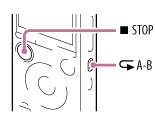
- During playback, press
 A-B to specify the starting point A.
“A-B B?” is displayed.
A-B to specify the starting point A.
“A-B B?” is displayed. - Press A-B again to specify the finishing point B.
“A-B” is displayed and the specified section is played back repeatedly.
Note
- You cannot set the point A and B near the beginning of a file or the end of a file, and around track mark.
- The illustrations used in this Help Guide are based on the ICD-SX1000 model. These illustrations may look different from the model you are using, however, the buttons and controls used for operations are the same.
Hint
- To cancel A-B repeat playback and change back to the normal playback, press A-B again.
- To stop A-B repeat playback, press
 STOP. The IC recorder is stopped but the A-B repeat setting remains. Press STOP again to release the A-B repeat setting.
 - To change the segment specified for A-B repeat playback, press A-B again during the A-B repeat playback. The play mode changes to the normal playback. Perform the steps 1 and 2 again to re-set the range of the A-B repeat playback.