
You can register recording settings you want to use in “My Scene 1” or “My Scene 2” in the Scene Select setting.
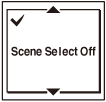
- Press SCENE to enter the scene selection display, and then select “Scene Select Off.”
- Set the following recording menu items to the setting you want to use.
You can set “REC Mode,” “Sensitivity setting” for “Built-in Mic Setting” / “Ext. Input Setting,” “LCF(Low Cut),” “LIMITER,” and “VOR.”
- Press SCENE to enter the scene selection display, and then select “My Scene 1” or “My Scene 2,” and then press
 .
. - Press
 or
or  to select “Copy Current Settings,” and then press .
“Copy Current Recording Setting?” appears on the display.
to select “Copy Current Settings,” and then press .
“Copy Current Recording Setting?” appears on the display. - Press or to select “Execute,” and then press .