
When you set the “Sensitivity setting” item for “Built-in Mic Setting”/“Ext. Input Setting” to “Manual,” you can adjust the recording level manually, according to the sound source. If necessary, you can also utilize the “LIMITER” setting in the menu to reduce sound distortion.
- Do one of the following:
- When recording using the built-in stereo microphone
Select MENU - “Built-in Mic Setting” - “Sensitivity setting” of “Stereo Mic.” - “Manual.”
- When recording using the built-in zoom microphone
Select MENU - “Built-in Mic Setting” - “Sensitivity setting” of “Zoom Mic.” - “Manual.”
- When recording using an external microphone
Select MENU - “Ext. Input Setting” - “Sensitivity setting” of “MIC IN” - “Manual.”
- When recording from an external device
Select MENU - “Ext. Input Setting” - “Sensitivity setting” of “Audio IN” - “
 Manual.”
- When recording using the built-in stereo microphone
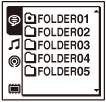
- Select a folder.
- Turn the microphones in the direction of the source to be recorded.
- Press and hold
 REC/PAUSE.
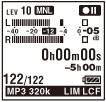
The IC recorder enters the recording standby mode. When the microphones pick up sound, the level meter in the display window moves.
- Press
 or
or  to adjust the recording level, depending on the sound source.
You can check the recording level value with the peak meter of the display window. Adjust the level closer to –12 dB, into a range that is appropriate for your sound source(
 ).
).When the recording level is too high,
 appears (
 ) and the peak lamp (ICD-SX1000 only) lights up. In this case, press to adjust the recording level downward until disappears and the peak lamp (ICD-SX1000 only) turns off, to prevent sound distortion.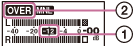
Press and hold
or to change the recording level value continuously. The sound level is also displayed as a number at the right side of the level meter. - Make other settings according to the state of recording.
If necessary, utilize the “LIMITER” setting in the menu.
- To start recording, press REC/PAUSE.
- To stop recording, press
 STOP.
STOP.
Note
- In the manual recording mode, you cannot record with the VOR function.
- In the manual recording mode, you cannot review the current recording, even if you
press
 .
.