
IC RecorderICD-UX532/UX533/UX533F/UX534F
About the recording level guide
During recording, the recording level guide ( ) is displayed.
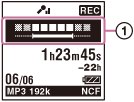
The upper meter shows the current input level. The white bar in the lower meter shows the optimum input level for recording.

Please adjust the orientation of the built-in microphones, the distance from the sound source, the microphone sensitivity, or the scene select setting so that the upper input level fits within the lower optimum range, as illustrated above.
Hint
- If the white portion of the input level meter is short, we recommend that you place the IC recorder nearer to the sound source or set the microphone sensitivity higher.
 Go to Page Top