
IC RecorderICD-UX532/UX533/UX533F/UX534F
Recording sound from the built-in microphones
The following steps are the basic recording procedures using the specified microphone sensitivity and recording mode.
Note
- Noise may be recorded if an object, such as your finger, etc., accidentally rubs or scratches the IC recorder during recording.
Hint
- Before you start recording, we recommend you make a trial recording first, or monitor the recording.
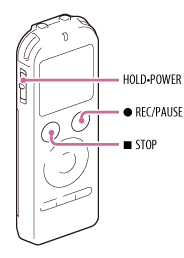
- Slide the HOLD•POWER switch in the direction of “POWER” to turn on the IC recorder, or towards the center to release the IC recorder from the HOLD status.
The stop mode window appears.
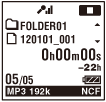
- Select the desired folder.
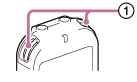
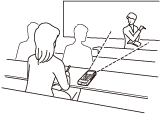
- Place the IC recorder so that the built-in microphones (
 ) face the direction of the source to be recorded.
- Press
 REC/PAUSE in the stop mode.
The operation indicator (
 ) lights in red.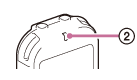
You do not need to press and hold
REC/PAUSE while recording. The new file will be automatically recorded as the last file in the current folder.
During recording, the recording level guide (
 ) is displayed.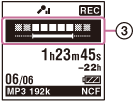
- Press
 STOP to stop recording.
The “Accessing...” animation appears and the IC recorder stops at the beginning of the current recording file.
STOP to stop recording.
The “Accessing...” animation appears and the IC recorder stops at the beginning of the current recording file.
Note
- The IC recorder is recording data and storing it on the memory media when the “Accessing...” animation appears on the display. While the IC recorder is accessing data, do not remove the battery or connect or disconnect the USB AC adaptor (not supplied). Doing so may damage the data.
 Go to Page Top