


Parts and controls
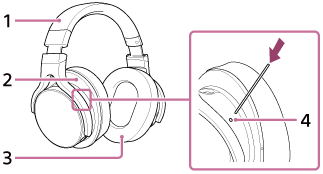

- Headband
- Left (
 ) unit
 - Right (
 ) unit
 - RESET button
Press the button with a pointed object, such as a pin, to reset the headphones.
- Input jack (stereo mini) cover
- Input jack (stereo mini)
- Micro USB port (Type B) (
 PC/CHARGE) : For connecting to a computer or charging the headphones
 - Micro USB port (Type AB) () : For digitally connecting with WALKMAN, Xperia, and iPhone/ iPad/iPod
- POWER button/indicator
- VOL +/- knob
The + side of the VOL +/- knob has a tactile dot. Use it as a guide for operation.