


Connecting to a digital output supported Xperia
You can connect the headphones to a digital output supported Xperia using the digital cable for Xperia (supplied).The headphones are compatible with High-Resolution Audio format files, up to 192 kHz/24 bit PCM, DSD 2.8 MHz or DSD 5.6 MHz*.
* The DSD format is converted to the linear PCM format when playing back.
The compatibility of digital output supported Xperia models depend on the country/region. For the latest compatible models, access the following URL:When connecting an Xperia model that is unsupported by the digital-output, follow the connecting method described in “Connecting to Xperia models unsupported by digital-out.”
- Turn on the Xperia.
- Connect the Xperia to the micro USB port (Type AB) (
 ) using the digital cable for Xperia (supplied).
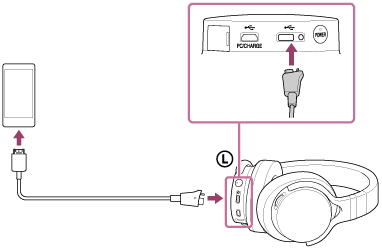
You can listen to music on the Xperia by connecting it to the micro USB port (Type AB) (
) while charging the headphones with the micro USB port (type B) ( PC/CHARGE).
Note
- The headphones only support the audio playback function of Xperia.
- Turn on your Xperia before operating the headphones.
- Some operations may not be possible with the headphones even if you use a supported Xperia model.
- You cannot adjust the volume of the Xperia when it is connected to the headphones.