


Location and function of parts
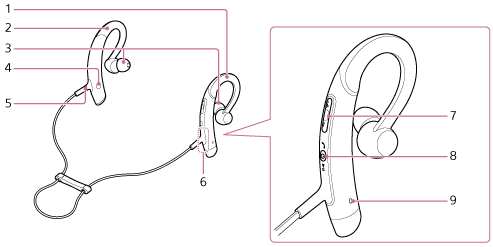
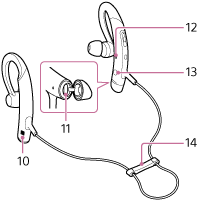
 right unit
 left unit
- Earbuds
- L mark
- Tactile dot
The left unit has a tactile dot. - Built-in antenna
A BLUETOOTH antenna is built into the headset. - +/-/
 /
/ buttons
 - Multi-function button
 /
/ /
/ button
 - Microphone
Picks up the sound of your voice when talking on the phone. - N-mark
- Micro-USB port
Connect a computer to this port with the supplied micro-USB cable to charge the headset. - Indicator (blue/red)
Lights up in red during charging.
Lights up in red or blue to indicate the power or communication status of the headset. - R mark
- Cable adjuster
