


Connecting to your BRAVIA TV
Follow the steps below to connect the Smart Stick to your TV.
If you use a Cable/Satellite Box, go to step 2. Also see “Connecting the Cable/Satellite Box.”
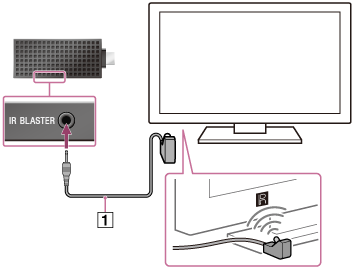
- Connect the IR Blaster cable (
 ) to the Smart Stick. Place the other end near your TV as illustrated below.
- Connect the Smart Stick and your TV using the Micro USB cable (
 ) to supply power to the Smart Stick.
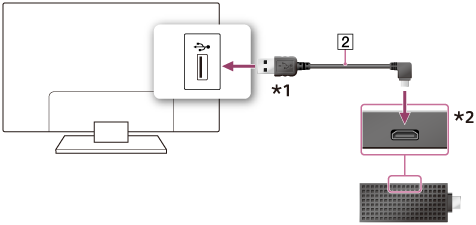
*1 Do not connect this plug to devices other than the BRAVIA TV.
*2 This jack is for power supply from BRAVIA TV.
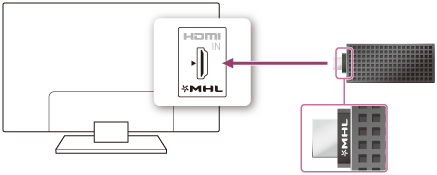
- Connect the Smart Stick directly to your TV.
If your TV has two MHL jacks, connect the Smart Stick to the HDMI 4 jack.
Note
- If your TV has a terminals cover for the terminals area on the back of the TV, do not re-attach the cover after you connect the Smart Stick to your TV.