Help Guide
menu
search
How to use
Troubleshooting
List of Topics
Back to Top
How to use
Personal Content Station (PCS)
LLS-201
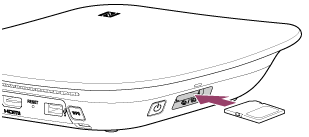
Inserting a memory card
Correctly orientate the memory card, then insert it into the memory card slot until it clicks.
Related Topic
Parts and controls
Ejecting a memory card
Supported memory cards
 Help Guide