
You can connect PCS to a TV either by using an HDMI cable, or via DLNA. For information on how to connect via DLNA, see "Viewing images with DLNA certified devices."
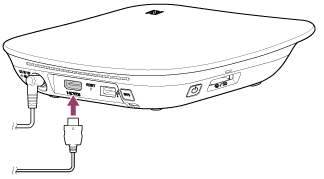
- Connect an HDMI cable (Type A, sold separately) to the HDMI output connector of PCS.
- Connect the other end of the cable to the HDMI input connector of your TV.
- Set the TV’s input to that of the connected connector.
Note
- For details on the HDMI input connector location and how to set your TV’s input, refer to the instruction manual of the TV.
- It is recommended that a Sony brand HDMI cable is used.