

- Using the TV with Other Devices
- Audio system (such as an AV receiver or sound bar)
- Using the TV as a centre speaker (only models with TV centre speaker mode)
Using the TV as a centre speaker (only models with TV centre speaker mode)
Models with a TV centre speaker mode have 中置揚聲器輸入 terminals or S-中置揚聲器輸入 terminals on the back of the TV.
On TVs with S-中置揚聲器輸入 input, you can use the TV as a centre speaker in the following cases.
- When a sound bar with an S-CENTER OUT output/jack is connected
By using the TV as a centre speaker, conversations sound natural because you can hear them from the screen and its vicinity.
Hint
- Some models have both 中置揚聲器輸入 and S-中置揚聲器輸入 terminals.
- Connect the device to the TV while referring to “Connecting an AV receiver with a speaker cable” or “Connecting a sound bar (only models with S-中置揚聲器輸入 terminals)” below.
- Press the
 (Quick Settings) button on the remote control, change [Settings] — [Display & Sound] — [Audio output] — [Speakers] to [Audio system].
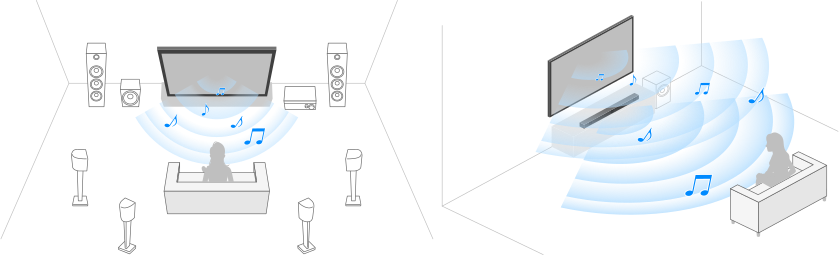
Speaker cable connection
Connect the TV and AV receiver with a speaker cable.
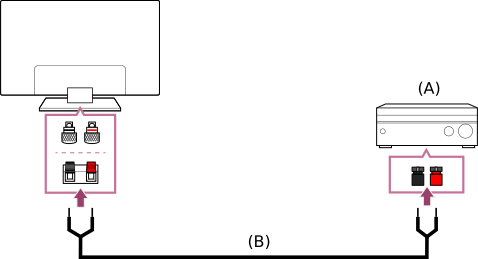
- AV receiver
- Speaker cable (not supplied)
Use a speaker cable (not supplied) to connect the AV receiver to the 中置揚聲器輸入 terminal of the TV.
When connecting, make sure to twist the ends of the speaker cable and insert them into the connection terminals of the TV and AV receiver.
The 中置揚聲器輸入 terminal varies depending on the model. Refer to the figures below when connecting the speaker cable.
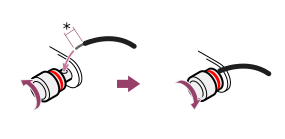
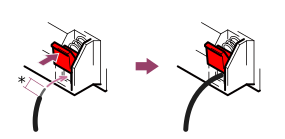
*Strip about 10 mm (13/32 inches) of insulation from the speaker cable at each end.
Note
- To prevent the wires of the speaker cable from touching each other, make sure not to strip too much of the speaker cable.
- Connect the speaker cable properly so that the polarities (+/-) between the TV and AV receiver match.
- Using the TV with Other Devices
- Audio system (such as an AV receiver or sound bar)
- Using the TV as a centre speaker (only models with TV centre speaker mode)