

- Useful features
- Searching for content/operating the TV with your voice
- Using the remote control microphone
Using the remote control microphone
Remote controls that support voice control have a MIC button, and a built-in microphone. By speaking into the microphone, you can search for various content.
- Press and hold the MIC button on your remote control.
The microphone on the remote control will be activated while the button is pressed, and the LED on the remote control will light up.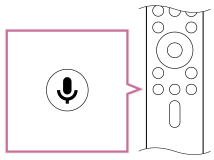
- Speak into the microphone while pressing and holding the MIC button.
Speech examples may be displayed depending on your model.
Search results are displayed when you speak into the microphone.
Hint
- If you press the MIC button on the remote control and say “你能干什么” or “语音说明”, information about how to speak and available voice commands will be displayed.
Note
- An Internet connection is required to use voice search.
- The type of remote control supplied with the TV, and the availability of a remote control with a built-in microphone varies depending on your model/region/country. An optional remote control is available in some models/regions/countries.
To use the built-in MIC, you may need to update the TV's software.
- Useful features
- Searching for content/operating the TV with your voice
- Using the remote control microphone