

- Useful features
- Searching for content/operating the TV with your voice
- Using the built-in MIC on the TV (only TVs with a built-in MIC)
Using the built-in MIC on the TV (only TVs with a built-in MIC)
The built-in MIC on the TV may not be available depending on your region/country/language.
To use the built-in MIC, you may need to update the TV's software.
Select within the text to jump to the related settings screen.
Do more on your TV using only your voice. Just start with “小微小微” to:
- Control your TV and smart home devices
- Enjoy music and entertainment
- Get answers
- Plan your day and manage tasks
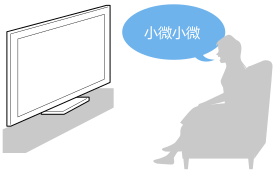
Face the TV and say, “小微小微”.
When the LED blinks , start speaking.
- The LED located at the bottom centre of the TV lights up amber when hands-free operation is available.
To use the built-in MIC, enable the following setting.

Note
- An Internet connection is required to use the TV's built-in MIC.
- Power consumption will increase when the built-in MIC is enabled as it is always listening.
Hint
- When the built-in MIC switch on the TV is enabled, the Operational response LED lights up in amber even when the TV is turned off (you can also set it so it does not light up).
- With the TV's built-in MIC enabled, you can say “小微小微, Where is the remote control?” to the TV to play a buzzer from the remote control. This is useful when you cannot find the remote control. For details, refer to Finding the remote control (only models supplied with a buzzer built-in remote control).
- While facing the TV, say “小微小微”, and then say the following words. Information about how to speak and available voice commands will be displayed.
- 你能干什么
- 语音说明
- Useful features
- Searching for content/operating the TV with your voice
- Using the built-in MIC on the TV (only TVs with a built-in MIC)