

- Connecting to a Network
- Home network features
- Adjusting home network settings
Adjusting home network settings
Select within the text to jump to the related settings screen.
You can adjust the following home network settings.
To connect to a server
Connect the client device (TV) and the server device (BD/DVD recorder) to the same network.
To register the TV as a client device on the server, refer to the server device manual.
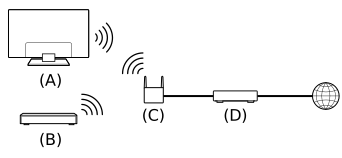
- TV
- BD/DVD recorder
- Wireless LAN router
- Modem
To check the server connection
Press the  (Quick Settings) button on the remote control, then select [Settings] — [Network and Internet] — [Home network setup] — [Server diagnostics] — follow the on-screen instructions to perform diagnostics.
To use the remote device
Press the (Quick Settings) button on the remote control, then select [Settings] — [Network and Internet] — [Remote device settings] — the desired option.
- [Control remotely]
- Enable operation of the TV from a registered device.
- Connecting to a Network
- Home network features
- Adjusting home network settings