


Infrapunakaugjuhtimispult
Kaasasolev kaugjuhtimispult ning nuppude paigutus ja nuppude nimetused erinevad olenevalt teie mudelist/riigist/piirkonnast.
Kaugjuhtimispuldi ülemised nupud
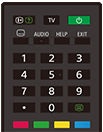
 (Teabe/teksti avaldamine)
Kuva teave.
TV
Lülitage telekanalile või sisendile ja kuvage Teleri menüü. Täpsema teabe saamiseks vaadake lehekülge Funktsiooni Teleri menüü kasutamine.
 (Toide)
Lülitab sisse ooterežiimi/võrguga ühendatud ooterežiimi.
 (Subtiitrite seadistus)
Lülitage subtiitrid sisse või välja (kui funktsioon on saadaval).
AUDIO
Valige parajasti vaadatava saate jaoks mitmekeelse allika heli või duaalheli (olenevalt saate allikast).
HELP
Abimenüü kuvamine. Siit saate avada juhendi Spikker.
EXIT
Minge tagasi eelmisele ekraanile või väljuge menüüst. Kui interaktiivne rakenduse teenus on kättesaadav, vajutage teenusest väljumise valikule.
Numbrinupp/・(Punkt)
Digikanalite valimiseks kasutage nuppe 0–9.
 (Tekst)
Tekstiteabe vaatamine.
Värvinupud
Täitke sel hetkel vastav funktsioon.
Kaugjuhtimispuldi alumised nupud
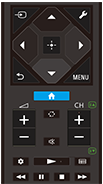
 (Sisendi valik)
Kuvage ja valige sisendi allikas jne. Täpsema teabe saamiseks vaadake lehekülge Sisendite valimine.
 (Kiirsätted)
Funktsiooni Kiirsätted kuvamine. Täpsema teabe saamiseks vaadake lehekülge Funktsiooni Kiirsätted kasutamine.
 (Üles) /
 (Alla) /
 (Vasakule) /
 (Paremale) /
 (Sisesta) (Navigeerimise D-Pad)
Ekraanil navigeerimine ja valimine.
 (TAGASI)
Eelmisele ekraanile naasmine.
 (KODU)
Teleri avamenüü kuvamine. Täpsema teabe saamiseks vaadake lehekülge Kodumenüü.
MENU
Saate kuvada teleris menüü, et kasutada ekraanil nupufunktsioone, mida kaugjuhtimispuldil pole.
 +/- (Helitugevus)
Helitugevuse reguleerimine.
 (Hüppa)
Kahe kanali või sisendi vahel edasi-tagasi liikumine. Teler liigub kehtiva kanali või sisendi ja eelmise valitud kanali või sisendi vahel.
 (Vaigista)
Heli vaigistamine. Heli taastamiseks vajutage uuesti.
Vihje
- Hõlbustusfunktsioonide otseteede teenuse saab sisse või välja lülitada, vajutades ja hoides 3 sekundit all nuppu
(Vaigista).
CH +/- (Kanal)
Telerirežiimis: Kanali valimine.
Tekstirežiimis: Valige
 (Järgmine) või
 (Eelmine) lehekülg.
 (Juhtpaneel)
Funktsiooni Juhtpaneel kuvamine.
 (Esita) /
 (Tagasikerimine) /
 (Paus) /
 (Stopp) /
 (Edasikerimine)
Kasutage teleris meediasisu ja ühendatud BRAVIA Sync-ühilduvusega seadet.
 (Telekava)
Saate kuvada teleri või kaabel-/satelliitvastuvõtja digitaalse saatekava. Täpsema teabe saamiseks vaadake lehekülge Telekava kasutamine.
Selle ekraani sulgemiseks ja Seaded ekraanile üleminekuks valige järgmine link.
 Avage Seaded ekraan.
Kaugjuhtimispuldi helide vaigistamine
-
Vajutage kaugjuhtimispuldil nuppu
(Kiirsätted) ja tehke järgmised valikud, et need keelata.[Seaded] — [Süsteem] — [Süsteemihelid]
Teave kaugjuhtimispuldi aku vahetamise kohta
- Avage kaugjuhtimispuldi kaas, nagu allpool näidatud.
- Eemaldage kaugjuhtimispuldi kaas ja vahetage akud uute vastu.
- Kontrollige, kas iga aku suund kattub akupesa positiivse (+) ja negatiivse (-) sümboliga.
-
Liuguri tüüpi

-