


Music playback operations
The following operations are available on the music playback screen.
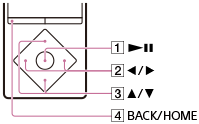
To play/pause
Press the button ( ).
).
To fast forward or rewind
Press and hold the button ( ).
).
To go to the beginning of the next song or go to the beginning of the previous (or current) song
Press the button ().
To browse cover art to select an album
Press the button ( ).
).
To add a song to the bookmark list
Press and hold the button ().
Songs can be added to the bookmark list individually. Albums cannot be added.
To return to the list screen
Press the button ( ).
).
Hint
- If there is no operation for an extended period while paused, your Walkman will be turned off automatically.