


Browsing the music playback screen
The following items are displayed on the music playback screen.
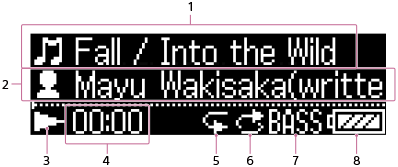
- Song title
- Selected search method
-
Playback status
Play (
 ), pause (
 ), fast forward (
 ), fast rewind (
 ), go to beginning of previous (or current) song (
 ), or go to beginning of next song (
 ) indication icons.
 - Elapsed time of current song
- Repeat indication
- Shuffle indication
- Equalizer/Bass Boost indication
- Battery status icon
Note
- The items shown on the screen may differ depending on the playback status, the settings, and the current screen.