


Using the HOLD switch
You can use the HOLD switch to prevent the button from being pressed and operated accidentally.
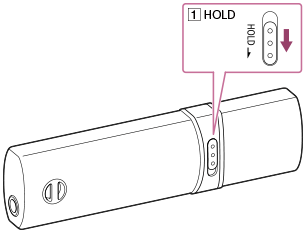
- Slide the
 switch in the direction of the arrow.
The HOLD function is enabled and all operation buttons are disabled.
switch in the direction of the arrow.
The HOLD function is enabled and all operation buttons are disabled.
Hint
- Slide the switch to the opposite position to release the HOLD function.
-
 [HOLD] is displayed if buttons are pressed while the HOLD function is enabled.