
During the AGC recording, the peak meter used to adjust the recording level ( ) is displayed.
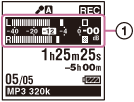
The upper meter shows the current input level. The white bar in the lower meter shows the optimum input level for recording.
Please adjust the orientation of the built-in microphones, the distance from the sound source, the sensitivity setting of the microphones, or the Scene Select setting so that the level is closer to -12 dB, which fits within the lower optimum range, as illustrated.
In manual recording, the level meter colors are reversed.
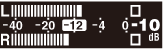
Recording sound using the built-in stereo microphones
The “L” and “R” meters show the current input level from the built-in stereo microphones.
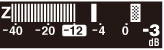
Recording sound using the built-in zoom microphones
The “Z” meter shows the current input level from the built-in zoom microphone.
Hint
- If the input level is low, we recommend that you place the IC recorder nearer to the sound source or set the input sensitivity higher.