


About the buttons on the headset
Use the buttons on the right unit of the headset for various operations, such as music playback or phone calls.
Main operations
Volume up/next button (A)

-
Press once briefly
Increases the volume. Repeat until the volume reaches the desired level.
-
Press and hold until you hear a notification sound
Skips to the beginning of the next track. After releasing the button, press it repeatedly within 1 second until a notification sound is heard and skip to the beginning of the next track.
Play/call/power button (B)
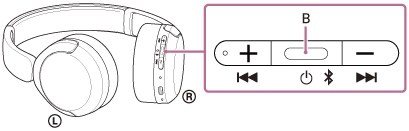
-
Press once
During music playback: Plays or pauses music.
For a phone call: Receives a call when there is an incoming call. Finishes the call during a call.
-
Press and hold until the indicator flashes
The headset turns on.
-
Press and hold until the indicator turns off
The headset turns off.
Volume down/previous button (C)

-
Press once briefly
Lowers the volume. Repeat until the volume reaches the desired level.
-
Press and hold until you hear a notification sound
Skips to the beginning of the previous track or the current track during playback. After releasing the button, press it repeatedly within 1 second until a notification sound is heard and skip to the beginning of the previous track.