


Preparing the battery (RNPT-2)
When using the tag for the first time
A lithium coin cell battery (CR2032) is already inserted into the tag at the time of purchase. Remove the insulation sheet before use.

When replacing the battery
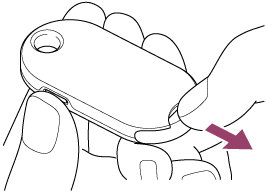
- While pressing the coin cell battery holder release button, insert the tip of your fingernail into the gap at the bottom of the back side and pull out the holder to remove the battery.
- Insert a new lithium coin cell battery (CR2032) (commercially available) so that the (+) terminal is facing the back side of the tag, and then insert the holder into the tag.