


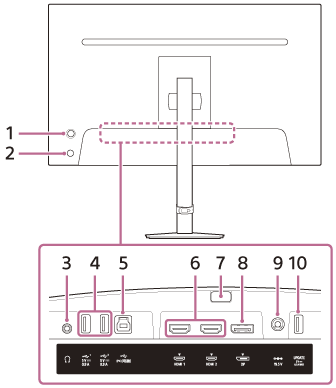
Rear view
-
Joystick
Makes the volume adjustment, brightness adjustment, input selection, and various settings by displaying the menu.
-
Power button
Turns on the power of the monitor. If you press this button while the monitor is on, the monitor is turned off.
-
Headphones jack
Connect headphones.
When headphones are connected, the speakers of this monitor are turned off. -
 USB Type-A port 1, 2
Connect USB peripherals such as a keyboard or mouse.
-
USB Type-B port
When connecting this port to the USB port on a computer, the USB Type-A port of 4. works as the USB hub.
-
HDMI Port 1, 2
Connect to a game console or computer with HDMI output equipped.
-
Stand detach button
Press to detach the stand.
-
DisplayPort port
Connect to a computer with the DisplayPort output equipped.
-
DC input terminal
Connect the AC adaptor (supplied).
-
UPDATE port
This is a port for updating the software.
