


Using the joystick
You can use the joystick to make the volume adjustment, brightness adjustment, input selection, and various settings by displaying the menu.
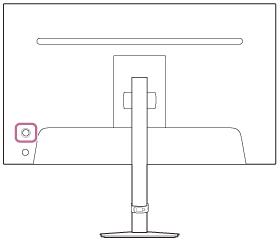
To adjust the volume
While the menu is not displayed, move the joystick on the rear of the monitor down.
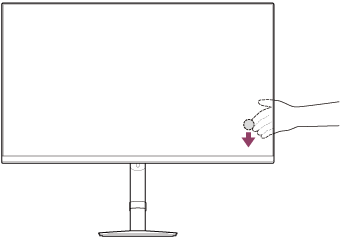
The volume adjustment screen is displayed, and you can perform the following operations.
- When viewed from the front, move it to the right (protrusion side) to increase the volume, and move it to the left to decrease the volume.
- Move the joystick down to mute the sound.
- Moving the joystick up while the mute screen is displayed will cancel the muted state and the screen returns to the volume adjustment screen.
- The volume adjustment screen disappears when you press the joystick while the screen is displayed, or no operation is performed for a while.
Hint
- The volume of the headphones jack and the volume of the built-in speaker can be set separately.
To adjust the brightness of the screen
While the menu is not displayed, move the joystick on the rear of the monitor up.
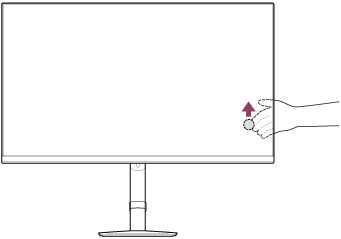
The brightness adjustment screen is displayed, and you can perform the following operations.
- Move it up or to the right to brighten the screen, and move it down or to the left to darken the screen.
- The brightness adjustment screen disappears when you press the joystick while the screen is displayed, or no operation is performed for a while.
Switching the input
While the menu is not displayed, move the joystick on the rear of the monitor to the left when viewed from the front of the monitor.
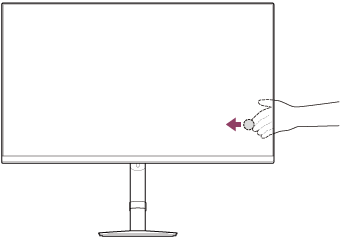
The input selection screen is displayed, and you can select the input.
- The input selection screen disappears when you move the joystick down while the screen is displayed, or no operation is performed for a while.
Switching the preset mode
While the menu is not displayed, move the joystick on the rear of the monitor to the right when viewed from the front of the monitor.
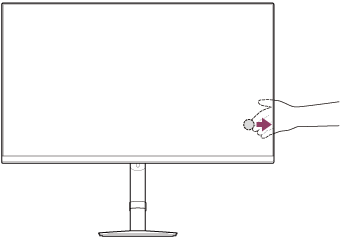
The preset mode selection screen is displayed, and you can select the preset mode.
- The preset mode selection screen disappears when you move the joystick down while the screen is displayed, or no operation is performed for a while.
To display the menu
While the menu is not displayed, press the joystick on the rear of the monitor.

The menu is displayed, and you can perform input selection and various settings by moving the joystick up, down, to the left, and to the right.
To turn off the menu
Move the joystick repeatedly to the left.
