Print

Upper buttons on the remote control

The included remote control, as well as the layout of the buttons and the button names, vary depending on your model/country/region.
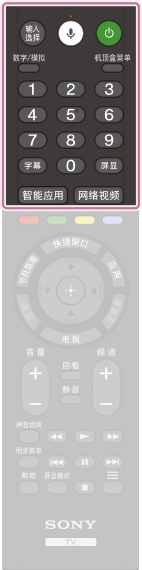
Illustration of the upper buttons on the remote control
输入选择
Display and select the input source.
(Microphone)
Search for various content with your voice.
For details, refer to Using the remote control microphone page.
(Power)
Turns on or switches to standby/networked standby mode.
数字/模拟
Switch between digital and analogue mode.
机顶盒菜单
Display the connected set-top box (cable/satellite box) menu after connecting and setting up the IR Blaster.
Number Button
Use with the 0-9 buttons to select digital channels.
字幕
Turn subtitles on or off (when the feature is available).
屏显
Display information.
智能应用
Access the application store.
网络视频
Access the video service.