Upper buttons on the remote control
The included remote control, as well as the layout of the buttons and the button names, vary depending on your model/country/region.
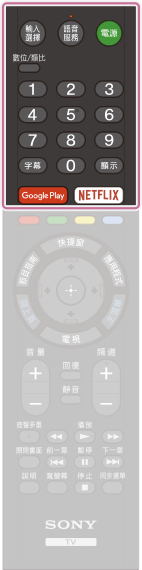 | - 輸入選擇
- Display and select the input source.
 (Microphone) (Microphone)- Search for various content with your voice.
For details, refer to Using the remote control microphone page. - 電源 (Power)
- Turns on or switches to standby/networked standby mode.
- 數位/類比
- Switch between digital and analogue mode.
- Number Button
- Use with the 0-9 buttons to select digital channels.
- 字幕
- Turn subtitles on or off (when the feature is available).
- 顯示
- Display information.
- Google Play
- Access the “Google Play” online service.
- NETFLIX (Only on limited region/country/TV models)
- Access the “Netflix” online service.
|

