


Remote control
The included remote control, as well as the layout of the buttons and the button names, vary depending on your model/country/region.
Upper buttons on the remote control
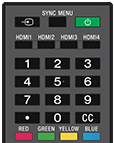
 (Input)
Display and select the input source, etc.
SYNC MENU
Display the BRAVIA Sync Menu.
 (Power)
Turns on or switches to standby/networked standby mode.
HDMI 1/2/3/4
Switch to the HDMI input.
Number Button/・(Dot)
Use with the 0-9 buttons to select digital channels.
CC
Turn subtitles on or off (when the feature is available).
Color buttons
Execute corresponding function at that time.
Lower buttons on the remote control
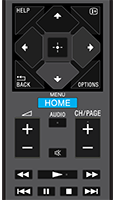
HELP
Display the Help menu.
 (Info/Text reveal)
Display information.
 /BACK
/BACK
Return to the previous screen.
OPTIONS
Displays a list of functions that can be used at that time.
 (Up) /
 (Down) /
 (Left) /
 (Right) /
 (Enter) (Navigation D-Pad)
On screen menu navigation and selection.
HOME/MENU
Display the Home menu.
 +/- (Volume)
Adjust the volume.
AUDIO
Select multilingual source sound or dual sound for the program currently being viewed (depending on program source).
 (Mute)
Mute the sound. Press again to restore the sound.
Hint
- The accessibility shortcut service can be turned on or off by pressing and holding
(Mute) for 3 seconds.
CH/PAGE +/-
Press to change a channel or a page.
 (Fast rewind) /
 (Play) /
 (Fast forward) /
 (Previous search) /
 (Pause) /
 (Stop) /
 (Next search)
Operate media contents on the LCD Monitor/LCD Display and connected BRAVIA Sync-compatible device.