


Inputs
The number of terminals may differ depending on the model. For details, refer to the specifications of each model.
You can display information about HDMI input, change the name, and set the signal format.
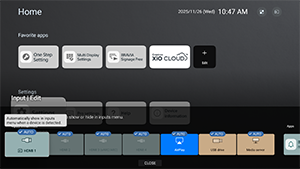
[External inputs]
You can specify the HDMI input name and display/hide settings for the information displayed on the display when you operate [Input select] with the remote control. If you select disable when a specific device is always connected, the user will not be able to switch.
[BRAVIA Sync settings]
You can turn the power of a Sony BRAVIA Sync device connected via HDMI on or off in conjunction with the power operation of the remote control.
About BRAVIA Sync

BRAVIA Sync is a Sony interlocking function that allows you to control HDMI connected devices with the LCD Monitor/LCD Display remote control.
Devices bearing the logo, such as Blu-ray recorders and audio systems, are compatible.
[HDMI signal format]
The display has multiple HDMI input jacks. You can specify the video signal format according to the following setting.
[HDMI 1] / [HDMI 2] / [HDMI 3 (eARC/ARC)] / [HDMI 4]
There are two choices. [Standard format] prioritizes compatibility with the connected device, and [Enhanced format] prioritizes video quality on 4K devices.
Note
- Support for the display of 4K 60Hz picture depends on your model/region/country.
- When using Enhanced format, picture and sound may not be output correctly. In this case, connect the device to an HDMI IN that is in [Standard format], or change the HDMI signal format of HDMI IN to [Standard format].
- Only set to Enhanced format when using compatible devices.
- When you watch 4K picture with High-Quality, use a Premium High Speed HDMI™ Cable(s) that supports speeds of 18 Gbps. For details on a Premium High Speed HDMI™ Cable(s) that supports 18 Gbps, refer to the cable specifications.