


Main Unit
Main unit
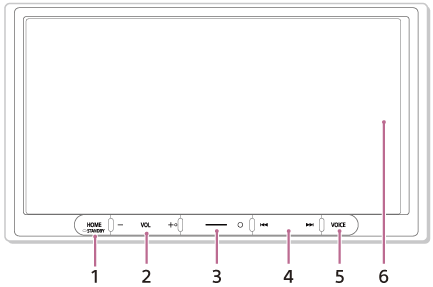
The VOL (volume) + button has a tactile dot.
-
HOME
Displays the HOME screen.
 STANDBY
Press and hold to turn off the unit.
Press and hold for more than 10 seconds to reset the unit. - VOL (volume) +/–
-
Custom
Registers functions (Mute, Disp. Off (display off), Source Change, Sound Settings, Subwoofer / EQ).
To register, select [Settings] [Customize][Custom Button].
 -
 /
/  (previous/next)
Functions differently depending on the selected source:
[Radio]: select a preset station.
[SiriusXM]: select a preset channel. (XAV-AX3700(UC))
[USB]: move to the previous/next content.
[Bluetooth Audio]: move to the previous/next content.
[Apple CarPlay]: move to the previous/next content.
Press and hold to:
[Radio]: tune into a station automatically (SEEK+/SEEK–).
[USB]: fast-reverse/fast-forward.
[Bluetooth Audio]: fast-reverse/fast-forward. -
VOICE
Activates the voice command function for Apple CarPlay. - Display/touch screen