


Connecting with a Paired BLUETOOTH Device
To use a paired BLUETOOTH device, connection with this unit is required. Some paired BLUETOOTH devices will connect automatically.
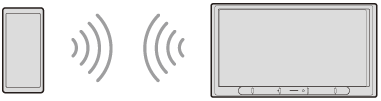
Activate the BLUETOOTH function on the BLUETOOTH device.
- Press HOME, then touch [Settings].If [Settings] is not set in the Favorite area, touch [All Apps] to display the HOME2 screen, then select [Settings].
- Touch [Device Connection].The list of paired BLUETOOTH devices appears.
Select the BLUETOOTH device.
To connect from the BLUETOOTH device
When setting the BLUETOOTH setting of the BLUETOOTH device to [ON], select “XAV-AX3700” on the setting screen of your BLUETOOTH device. Connection is made automatically.
Note
- When using Apple CarPlay, the BLUETOOTH connection of iPhone itself is not possible.
If you switch from Apple CarPlay to the BLUETOOTH connection, disconnect your iPhone from the USB port, then connect it with the BLUETOOTH function. - When using Apple CarPlay, only the BLUETOOTH playback of other devices is available at the same time. The BLUETOOTH handsfree call function of other devices is not available at the same time.
To connect the last-connected BLUETOOTH device from this unit
When the ignition is turned to on with the BLUETOOTH signal activated, this unit searches for the last-connected BLUETOOTH device, and connection is made automatically. When disconnecting Apple CarPlay with the BLUETOOTH signal activated, this unit searches for the last-connected BLUETOOTH device, and connection is made automatically.
To capture your voice during handsfree calling
You need to install the microphone (supplied).
To install the microphone (supplied)
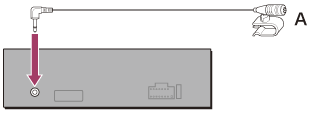
Connect the microphone (supplied) to the MIC IN connector.
For details, refer to “Operating Instructions” (supplied).
Set the connected microphone in your car.
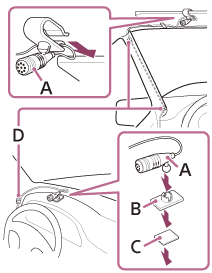
A. Microphone (supplied)
B. Flat-mount base (supplied)
C. Double-sided tape (supplied)
D. Clip (not supplied)