


List of icons on the screen
List of shooting mode icons
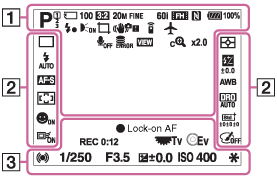
List of viewing mode icons
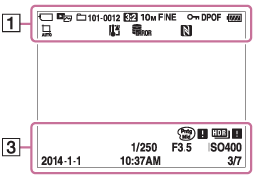
-

 P P* A S M


- Shooting mode

- Memory number


- Memory card/Uploading status


- Scene Recognition icons


- Scene Selection
- 100
- Remaining number


- Aspect ratio of still images
- 24M / 20M / 12M / 10M / 6.0M / 5.1M


- Image size of still images


- Image quality of still images


- Frame rate of movies


- Recording settings of movies

- NFC is activated

- Remaining battery

- Remaining battery warning

- Flash charge in progress

- AF Illuminator


- Auto Object Framing


- SteadyShot

- Remote controller

- Camera-shake warning

- Airplane Mode

- No audio recording of movies

- Wind Noise Reduction

- Overheating warning


- Database file full/Database file error

- Setting Effect OFF

- Smart Zoom

- Clear Image Zoom

- Digital Zoom

- Spot metering area


- View Mode
- 100-0003
- Folder - file number


- Recording format of movies

- Protect
- DPOF
- DPOF set
-


- Drive Mode


- Metering mode


- Flash mode/Red-eye reduction
 ±0.0
±0.0- Flash compensation


- Focus mode


 7500K A5 G5
- White balance


- Focus area


- D-Range Opt./Auto HDR


- Smile/Face Detect.


 ±3 ±3 ±3
- Creative Style


- Lock-on AF


- Picture Effect

Smile detection sensitivity indicator -
 Lock-on AF
- Guide display for Lock-on AF
- REC 0:12
- Recording time of the movie (m:s)

- Function of the control wheel

- Function of the control dial


- Focus
- 1/250
- Shutter speed
- F3.5
- Aperture value
 ±0.0
±0.0- Metered Manual
 ±0.0
±0.0- Exposure compensation
- ISO400
- ISO sensitivity

- AE lock

- Shutter speed indicator

- Aperture indicator

Histogram

- Picture Effect error

- Auto HDR image warning
- 2014-1-1
10:37AM - Date of recording
- 3/7
- File number/Number of images in the view mode